Verification of ELS in Isaiah 53
Table of Contents
Introduction
In this post I am going to show a method to verify short-distance ELS codes. You only need to run a couple of standard Linux commands to verify ELS over an input text. From a computational point of view it is an inefficient method, so it cannot be used to search for ELS codes, nor executed over large distances of ELS code and/or over very large amounts of text. However, it has the advantage that you do not need to install any specialized ELS software on your computer, and it is also reproducible.
Equidistant Letter Sequences (ELS)
A formal definition found in TorahBibleCodes:
Witztum, Rips, and Rosenberg (WRR) define an Equidistant Letter Sequence (ELS) as a sequence of letters in the text whose positions - not counting spaces - form an arithmetic progression. That is to say the letters are found at the positions
n, (n + d), (n + 2d), (n + 3d),... (n + (k - 1)d)
WRR define n as the start, d as the skip between letters in the search-term, and k as the length of the ELS. These three parameters uniquely identify the ELS which is denoted (n, d, k).
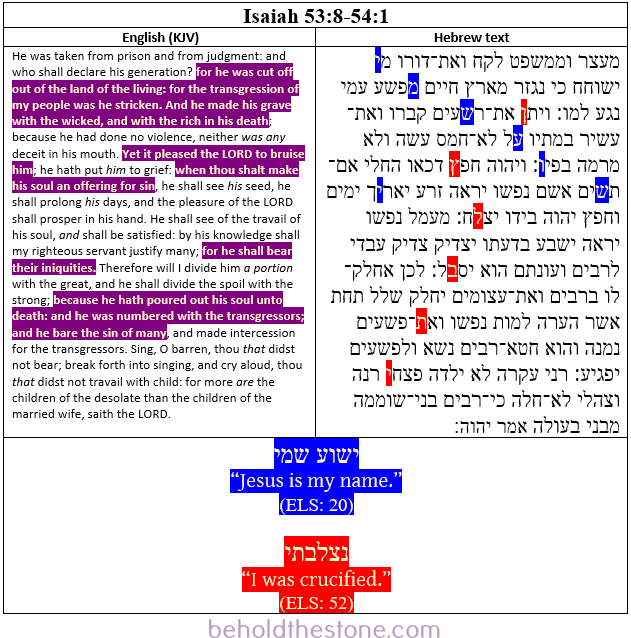
Here is an example found in Isaiah 53:8 to 54:1, with two ELS on the same section of text:
Regular expressions
Regular expressions are patterns used to match character combinations in strings. They’re like a special language that helps you find patterns in text.
The method
An ELS is nothing more than a pattern of letters separated by the same distance within a text (not counting blank spaces), so it can be found by means of a regular expression that could be described as follows:
The beginning of the text, followed by any letter any number of times, followed by the first letter of the sequence of letters that form the ELS, followed by any
d - 1letters, followed by the second letter, followed by anyd - 1letters … and so on.
Where d is the skip between letters from the definition above.
Matching the two Isaiah 53:8 to 54:1 ELS
The GNU sed commands to test the two ELS (see image above) are:
sed -E -n "s/^.+(\xD7\x99).{19}(\xD7\x9E).{19}(\xD7\xA9).{19}(\xD7\xA2).{19}(\xD7\x95).{19}(\xD7\xA9).{19}(\xD7\x99).+$/\7\6\5\4\3\2\1/p" isaiah.txtJesus is my name” (distance 20). Hebrew: ישוע שמי
sed -E -n "s/^.+(\xD7\x9F).{51}(\xD7\xA5).{51}(\xD7\x9C).{51}(\xD7\x91).{51}(\xD7\xAA).{51}(\xD7\x99).+$/\1\2\3\4\5\6/p" isaiah.txtI was crucified” (distance 52). Hebrew: נצלבתי
sed is a GNU command line program for filtering and transform text. It works with regular expressions
- -E: this argument tells the program to use Extended regular expressions
- -n: this argument tells the program to suppress automatic printing of pattern space (the input text)
- The pattern for the first command is:
^.+(\xD7\x99).{19}(\xD7\x9E).{19}(\xD7\xA9).{19}(\xD7\xA2).{19}(\xD7\x95).{19}(\xD7\xA9).{19}(\xD7\x99).+$, where- ^: Start of text
- .+: Any letter one or more times
- (\xD7\x99): Yod letter in UTF-8
- .{19}: any letter 19 times (Equivalent to an ELS with with skip 20)
- (\xD7\x9E): Mem letter in UTF-8
- Same with the rest of the letters
- $: end of text
- The replacement (
\7\6\5\4\3\2\1) is each one of the groups captured in the pattern, presented in reverse order: \7 for the group number 7 and so on… This is used to show the captured letters in the patterns.
- If the pattern is found, the command prints the characters
- If the pattern is NOT found, the command prints nothing
I made a bash script to test for both ELS, obtaining the text from two different Hebrew Bibles:
- Miqra According to the Masorah (MAM): only
Jesus is my nameELS found. - Leningrad Codex:
Jesus is my nameandI was crucifiedELS found.
Download here.
chmod u+x isaiah-53-esl.sh
./isaiah-53-esl.sh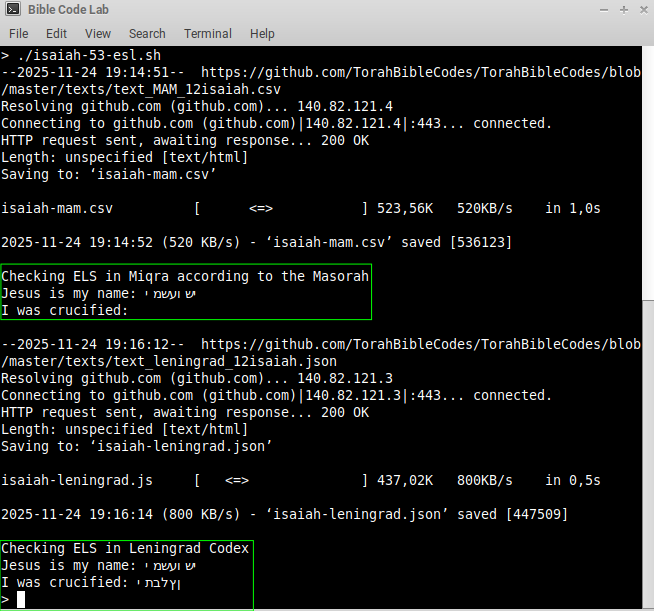
It may take more than 30 seconds to execute in old machines (more than 10 years old) and about 5 seconds on newer ones. The script could be improved executing the sed command only over the affected verses instead of the full Isaiah book, but there is not a straightforward method to do this with bash due how the source Leningrad text is formatted.
If this method is used over large amounts of text (eg: more than one Bible book) or to perform long ELS searches (distance or lenght), the proccess might allocate a lot of resources. It might take a long time to complete and/or your OS might freeze.
If you are interested in searching for new ELS codes, I recommend the TorahBibleCodes software. You can find more ELS codes in the website Behold The Stone.